Home > Dev. Kit > NFC Driver Board > NFC E-Ink Driver Board – Supports 4.2'' Mono & Color Displays, NFC-D4-042
Limited Offer!

NFC E-Ink Driver Board – Supports 4.2'' Mono & Color Displays, NFC-D4-042

SKU: NFC-D4-042
(0)
0 Sold
$11.32 $14.15
20% OFF
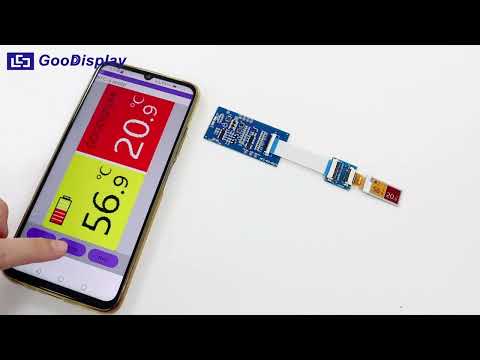
NFC-D4-042 development kit helps developers develop NFC-driven electronic paper display projects more quickly and smoothly. This kit supports refreshing 4.2-inch electronic paper displays.
GET $3.00 OFF ON ORDERS OVER $59.00
Get it
ERP72QDC
Received successfully
Coupon Code
CONTINUE SHOPPING
    Please select the information you wantX
Quantity:
0 in stock
  • NFC E-Ink Driver Board – Supports 4.2'' Mono & Color Displays, NFC-D4-042
  • NFC E-Ink Driver Board – Supports 4.2'' Mono & Color Displays, NFC-D4-042
  • NFC E-Ink Driver Board – Supports 4.2'' Mono & Color Displays, NFC-D4-042
  • NFC E-Ink Driver Board – Supports 4.2'' Mono & Color Displays, NFC-D4-042
  • NFC E-Ink Driver Board – Supports 4.2'' Mono & Color Displays, NFC-D4-042
  • NFC E-Ink Driver Board – Supports 4.2'' Mono & Color Displays, NFC-D4-042
  • NFC E-Ink Driver Board – Supports 4.2'' Mono & Color Displays, NFC-D4-042
  • NFC E-Ink Driver Board – Supports 4.2'' Mono & Color Displays, NFC-D4-042
1/1
  • NFC E-Ink Driver Board – Supports 4.2'' Mono & Color Displays, NFC-D4-042
  • NFC E-Ink Driver Board – Supports 4.2'' Mono & Color Displays, NFC-D4-042
  • NFC E-Ink Driver Board – Supports 4.2'' Mono & Color Displays, NFC-D4-042
  • NFC E-Ink Driver Board – Supports 4.2'' Mono & Color Displays, NFC-D4-042
Frequently Bought Together
more
Frequently Bought Together
  • Description


NFC-Driven 4.2 inch E-Ink Display Development Kit


NFC-D4-04 is a compact NFC-powered driver board for 4.2" E-Ink displays (mono), enabling wireless updates with no battery required. – Supports BMP/PNG/JPG


Special Features


● Eco-Friendly and Battery-Free: Utilizes NFC power harvesting, eliminating the need for batteries or external power, perfect for applications like price tags and name badges.
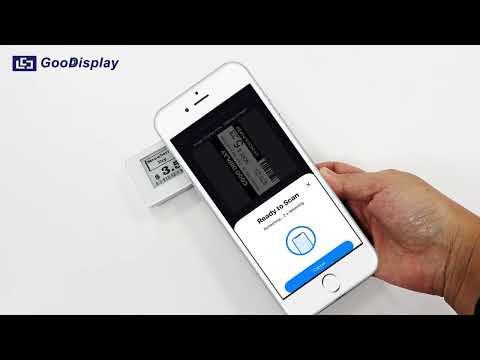
● Instant Content Updates: Easily update display content in seconds using a smartphone and the companion app, ideal for frequently changing information like restaurant menus, meeting room signs, or in-store promotions.
● User-Friendly Operation: No technical skills required; anyone can update content with a simple app, making it great for small businesses or offices with limited tech support.
● Flexible Image Formats: Supports BMP, PNG, and JPG, allowing for easy content customization.
● Convenience and Flexibility: NFC-based updates mean no wires or extra equipment, reducing maintenance costs and hassle, perfect for dynamic retail environments and logistics tags.


Technical Details


Product Specifications


PART NUMBER

 NFC-D4-042
DISPLAY PARAMETER

 Screen Size: 4.2"

 Screen Type: Black/White,
Black/White/Red/Yellow E-Ink Screen

POWER PARAMETER

 Power Supply: NFC

 Refresh Power: ≤15mW

SOFTWARE PARAMETER

Update Image Method: NFC Update Image

Language: Default English

PORT PARAMETER  FPC Interface: 24PIN 0.5mm
SPECIFICATIONS

 Weight: about 15g

 Outside Dimension:91x77x1.0mm

ENVIRONMENTAL PARAMETER

 Operating Temperature: 0℃~50℃

 Storage Temperature: -25℃~70℃

 Operating Humidity: 40%~70%


App Operation Steps for Android Users


 For Android Users
 Scan the QR code to get the app

 1.The app will detect the e-paper display and automatically perform data transmission and refresh operations.
 2.Please ensure that your phone's NFC is enabled before use. During data transmission and refreshing, do not move the phone.


For best results, place your phone steadily about 1–2 cm above the center of the e-paper display during NFC transmission.


NFC-Driven ePaper Compatibility Guide

GDEY042T81

GDEM042F52


About Us

Thank you for your interest in our product. We could provide front light, touch screen, and other accessories for you. For more information, please refer to the relevant manual available in our Library or visit our official website at [www.good-display.com].
If you need any further assistance or have any other questions, please feel free to contact us. We sincerely invite you to send your inquiries to our email at
[buyepaper@good-display.com].

CUSTOMER REVIEWS

0.0 0 Reviews
Write a review
$0.00 $0.00
Please choose options.Back to top
Close
$0.00 $0.00